

If you want to dynamically replace images, use image data binding.
- Keep the
.rivfiles tiny without potential bloat of larger assets - Dynamically load an asset for any reason, such as loading an image with a smaller resolution if the
.rivis running on a mobile device vs. an image of a larger resolution for desktop devices - Preload assets to have available immediately when displaying your
.riv - Use assets already bundled with your application, such as font files
- Sharing the same asset between multiple
.rivs
Methods for Loading Assets
There are currently three different ways to load assets for your Rive files. In the Rive editor select the desired asset from the Assets tab, and in the inspector choose the desired export option: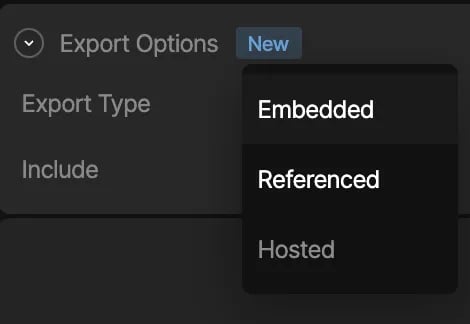
Embedded Assets
In the Rive editor, static assets can be included in the.riv file, by choosing the “Embedded” export type. As stated in the beginning of this page, when the Rive file gets loaded, the runtime will implicitly attempt to load in the assets embedded in the .riv as well, and you don’t need to concern yourself with loading any assets manually.
Caveat: Embedded assets may bulk up the file size, especially when it comes to fonts when using Rive Text (Text Overview).
Embedded is the default option.
Image CDNs
Some image CDNs allow for on-the-fly image transformations, including resizing, cropping, and automatic format conversion based on the browser’s and device’s capabilities. These CDNs can host your Rive image assets. Note that for these CDNs, you may need to specify the accepted formats, for example, as part of the HTTP header request:Referenced Assets
In the Rive editor, you can mark an imported asset as a “Referenced” export type, which means that when you export the.riv file, the asset will not be embedded in the file binary, and the responsibility of loading the asset will be handled by your application at runtime. This option enables you to dynamically load in assets via a handler API when the runtime begins loading in the .riv file. This option is preferable if you have a need to dynamically load in a specific asset based on any kind of app/game logic, and especially if you want to keep file size small.
All referenced assets, including the .riv, will be bundled as a zip file when you export your animation.
Caveat: You will need to provide an asset handler API when loading in Rive which should do the work of loading in an asset yourself. See Handling Assets below.
Handling Assets
- New Runtime
- Legacy Runtime
This section assumes that you have read through the Apple overview.Referenced assets can be added using the global asset APIs of a
Worker.Adding global assets is a two-step process:- Decode the asset from its bytes
- Add the asset to the worker
.zip file containing the assets. The unique identifier is the identifier that is appended to the asset name (e.g Font-1234).There is no need to maintain a strong reference to the asset. The asset will be automatically cleaned up when the worker is disposed.